Showing posts with label Google Play. Show all posts

Friday, 8 August 2014

Google Updates Play Music and Search Apps for Android With New Features


Google on Wednesday updated its Search and Play Music apps for Android with new features.
The Google Search app has been updated to version 3.6. The update is said to enable deep linking of apps through search and could possibly allow "Google to show content from inside an app and link you directly to it if you've got it installed," reported Android Police.

The updated Search app also includes a new pop-up warning when a user tries to enable 'Ok Google' hotword detection from any screen with a message, "Someone else may be able to use voice commands, such as calling or texting, or access your address, contacts and other personal information -even if your device is locked."

The updated Search app is also said to have new hands-free features from the rumoured KITT project from Google. While not much is known about the rumoured Android KITT project, it is said to be a project that's internally codenamed 'Android Eyes Free' that will allow car drivers to safely perform searches via voice.

The updated Google Search app seems to be rolling-out gradually across the world, as the Wednesday-updated app listed on Google Play India actually refers to other new features, specifically the new ability for public transport commuters to set an alarm "when it's time to get off the train/bus" (a feature that was being tested in June), along with a 'Things to watch on Chromecast' section, as well as some bug fixes and performance improvements.

Users who don't want to wait for the updated Search app to roll-out to their region can install the Google-signed apk from Android Police.


On the other hand, the Google Play Music app received a minor update which bumped the version up to 5.6.1616, from the previous 5.6.1609P. Notably, Google Play in India still lists the older updated version 5.6.1609P with the app updated on Wednesday.

The Google Play Music update includes a revamped 4x1 widget and has also added another 1x1 widget that gives instant access to the "I'm feeling lucky" radio, notes Droid-Life.

Users can simply tap on the new 1x1 widget to play random music directly from the home screen. The Manage downloads section in the updated Play Music app now shows the downloaded files along with the available space. Users can also 'undo songs that have been swiped away', while a long-press on a song in a playlist or the queue now lets users move it around. Those who don't want to wait for the updated Play Music to roll-out to their regions can download the Google-signed apk from Droid-Life.

Thursday, 3 July 2014

Android L Calculator On Google Play: Avoid It Like The Plague!


Much has been said about Android L, where the Developer Preview has already been rooted, in addition to having an emulator roll out so that you need not own a Nexus handset in the first place. Having said that, there is a new Android L app that is made available on the Google Play Store which is called the Android L calculator, although based on the user comments alone, you would do well to avoid this like the plague.
It does seem to be nothing more than a fake app, and as at time of publishing, it still remains on the Google Play Store. The Android L calculator does claim to transform one’s basic functions calculator into a scientific calculator, where you slide the advanced menu on to the screen in either portrait or landscape mode. Or so that is what it is supposed to do, but users who have given it a go already claim that there are terrible app permissions required, as it asks for permission to modify and delete your storage contents, where these will include both photos and media. Any idea as to the reason behind a calculator app requiring such permission levels?
You know what they say – fortune favors the bold – the thing is, if you’re still curious to find out what kind of capability this app has, go ahead and give it a try despite the fact that some commenters are not too happy with it.

Wednesday, 25 June 2014

EverythingMe Releases Its Contextual Launcher Globally


EverythingMe‘s contextual launcher aims to customize your Android home screen so that you get exactly what you need every time you switch on your phone. It’s the results of years of work on mobile discovery. And today, the app is available globally.
 At the time, it was an iPhone app to improve the mobile search experience.
“But the number of search queries are decreasing on mobile,” Ben-David told me. So that’s why the startup started working on something completely different — context.
You might get the Kindle app when you’re at home in the evening, and the Twitter app when you’re waiting at the bus stop in the morning
When it comes to mobile startups, it’s still a brand new world. Modern smartphones only hit the market in 2007, and countless of developers started providing content for this new platform. Hundreds of thousands of apps are now available at our fingertips.
Yet, this is also a challenge. You may have 150 apps on your phone, but chances are that you only use a dozen of them. “Nobody swipes to the third page of apps,” Ben-David said. This is where EverythingMe is useful.
Here’s how it works. When you switch on your Android phone, you will get four apps that are relevant to the time of the day, your location and more. For example, you might get the Kindle app when you’re at home in the evening, and the Twitter app when you’re waiting at the bus stop in the morning.
Sometimes, you are looking for something in particular beyond these four apps. For example, you might want to get the latest world cup results. This app might not necessarily show up in your top four apps as you don’t open the world cup app all year round. EverythingMe automatically organizes apps in smart folders. You will find the world cup app in the “Sports” folder, maybe in the “News” folder as well.
In these smart folders, you will get information cards so that you even get info without opening and app. And below, you will find the relevant apps depending on the category, as well as app suggestions from the Play Store. You won’t have to micromanage your phone to organize apps anymore, and you won’t miss on this cool new app you installed and forgot a few minutes later.
Finally, EverythingMe replaces the search engine of your phone. For example, if you contact someone very often, his or her name will show up at the top.
The team of 65 has received $37 million in funding over the years, and has attracted millions of downloads in its test markets since February. This contextual launcher also powers Firefox OS. Overall, EverythingMe is all about learning about your habits to make your phone even more personal.

Friday, 20 June 2014

Nokia Unveils 'Z Launcher' for Android 4.1 or Higher Devices


A Nokia division not owned by Microsoft on Thursday introduced a new Android launcher app called Z Launcher. The Z Launcher app is a limited pre-beta release right now, and is only available via the Z Launcher website, and not via Google Play.
The Nokia Z Launcher app is compatible with smartphones running Android 4.1 or higher, and is not optimised for Android tablets. At present, Nokia is testing the Z Launcher on the Google Nexus 5, Samsung Galaxy S III , Galaxy S4 , and Galaxy S5 . In order to download the launcher app, users will have to sign up with their Google account first. 
The Nokia Z Launcher is named after one of its key features that lets user write a letter in order to search for anything directly from the launcher screen. Nokia calls it 'Scribble', a feature that can search anything on the phone "in as little as one second." With Scribble, users just need to draw the first letter of the search and it finds the related app, contact or task.
When the Z Launcher will be installed, users will see the time, date and one upcoming calendar event at the top of the home screen. Just like other launchers, with a tap on time will open Android's clock app and tapping the calendar event will open the Calendar app. Other than that rest of the screen is acquired by few apps, contacts and web pages.

"We're releasing the first version of Z Launcher with a limited number of downloads initially, to see how it works and learn from your feedback. In the next few months we'll provide updates on new versions, features and availability", noted Brook Eaton, Lead Product Manager on Z Launcher's blog.
The Z Launcher app is an independent project by Nokia, free of Microsoft. The company is no longer a cellphone maker as it sold its devices and services business to Microsoft handset for EUR 5.44 billion.

Thursday, 12 June 2014

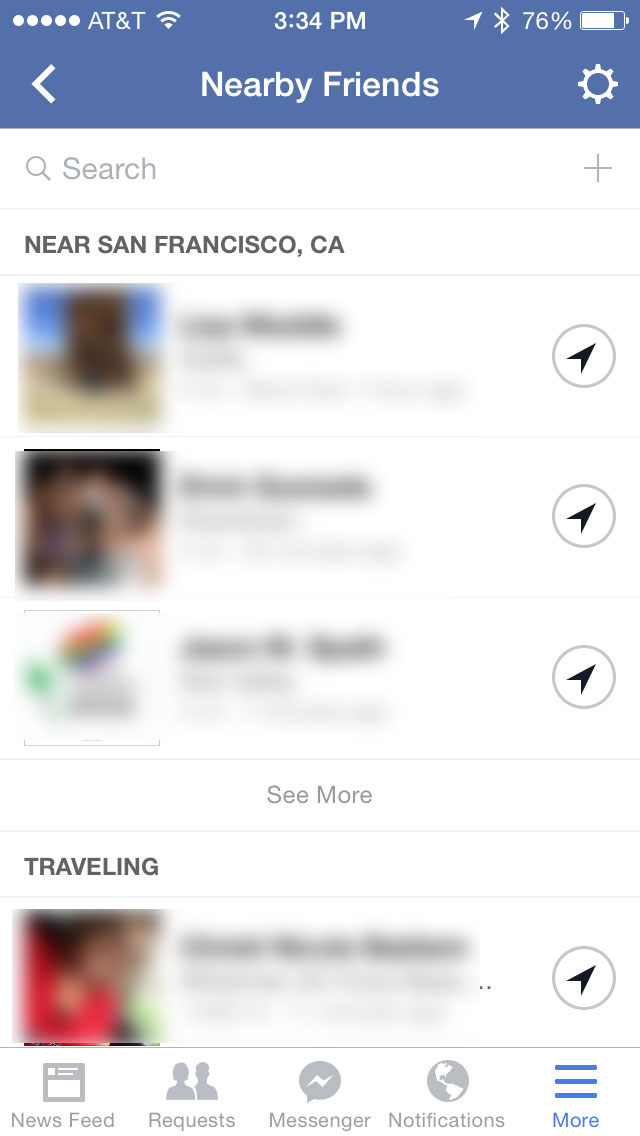
Facebook updates iOS and Android apps with Nearby Friends invites and offline likes


Fcebook has two updates on the mobile world today. Facebook for iOS 11.0 got new additions to its Nearby Friends  feature while Android hit version 10.0 with offline posting. Both updates are available now in the Google Play Store and App Store.
0611 nearby1 220x390 Facebook updates iOS and Android apps with Nearby Friends invites and offline likesFor the iOS version Facebook only posted that today’s update included “improvements for reliability and speed.” But TechCrunch reportsthat after a bit of digging, it found two new updates for Nearby Friends. In the US version of the app, the social network has added search and invite friends buttons.
For Android, Facebook has added the following new features:
  • Like posts, photos and Pages when you’re offline
  • Remove tags you’ve created
  • Remove tags of yourself that your friends have created
  • Turn post notifications on and off
  • Improvements to speed and reliability
Being able to remove tags that your friends have created is a wonderful way to make sure some of the more embarrassing things you did last night don’t end up in your Timeline.
➤ Facebook for iOS and Android

Tuesday, 8 October 2013

Hangouts 1.3 Will Reportedly Add SMS, Giving Android Its Own iMessage Equivalent

Google is said to be prepping an update
to its Hangouts instant messaging/video
chat Android app that would allow it to
integrate with SMS, making it possible
to get all text and MMS messages right
in the same inbox. That would fulfill a
promise made a long time ago, near
when Hangouts was first announced, by
Hangouts and Chat community manager
Dori Storbeck.

The new info comes from Android Police,
which says it had heard that Google
would be building SMS integration into
Hangouts in a version releasing soon, a
report which was then corroborated by
screenshots from an anonymous tipster.
In the screenshots, Hangouts is depicted
as showing messages clearly sent “via
SMS,” as well as being able to “Send an
SMS message” in the existing compose
screen. There’s also a screenshot of the
settings where SMS can be toggled on
and off.

The update would also offer up video
sharing via Hangouts, the report claims,
but the biggest news for both Google
and for other third-party messaging
platforms would be the SMS integration.
It would consolidate one more service/
app offering into Hangouts for Google,
which has already subsumed Google Talk
and Google+ Messenger. It would be
easy to see it taking the next logical
step from there and offering VoIP
services, too, providing a complete over-
the-top service.
It would also be potentially bad news
for competitors like WhatsApp and
Facebook Messenger. FB’s messaging app
already offers SMS integration, but
Google’s Hangouts version would ship on
devices pre-installed, and could
conceivably replace the Messaging app
altogether, making it the default option
for Android users. It could also eat
away at more carrier business, as
combining the two and favoring Google
+ based messaging first would have a
similar effect to iMessage, where
carriers eventually derive less revenue
from shuttling SMS content back and
forth.
SMS has long been in the cards for
Hangouts, and hopefully it’s arriving
soon. There’s no timeline attached to
the report, apart from some speculation
it could arrive with Android KitKat, but
in all likelihood this functionality will be
generally available to Hangouts users
regardless of their OS version.

Wednesday, 3 July 2013

Facebook Home Android update, changelog missing

As well as bringing news about useful
or entertaining apps, we also like to
detail app updates for our readers.
One of these is the Facebook Home
Android update, although the
changelog is missing. It seems rather
odd that Facebook hasn’t provided
these details for users of the app.
The Facebook Home Android app is a
free social app compatible with some
specific devices running Android 4.0
or later. The app enables users to
replace the standard home screens on
their phones and instead show a
stream of posts and photos from
friends. It allows access to apps with
just one swipe and also means that
users can continue chatting with
friends while using other apps, once
Facebook Messenger has been
downloaded.
The app was updated yesterday to, and
under the ‘What’s New’ description on
the app it urges users to update
Facebook for Android and Facebook
Messenger to get the latest Home
Features. Under “what’s in this
version” it merely says users can
customize their app launchers to a
favorites tray and that there are bug
fixes, but there is no detailed
changelog of anything new and the app
is still listed as version 1.0.
Facebook Home does not really seem
to have lived up to expectations so far,
and it’s a strange move to push out an
update where users cannot actually
see any obvious changes. It’s
possible that the Facebook Home
update could have something to do
with recent news of a Facebook beta
program opening, where it was stated
that BETA members would get early
access to app releases.
There haven’t been many phones
added to the list of compatible devices
for Facebook Home recently, but it’s
also possible that the update regards
further devices that have been added
that we don’t yet know about.
However, the only apparent change
that we’ve noticed so far is NVIDIA
SHIELD support. If you want to check
out the Facebook Home Android app
you can find it at Google Play here.
It would be really interesting to hear
from readers who may have found that
their devices are now supported by
Facebook Home? Alternatively, if you
notice any other changes to the
Facebook Home Android app, please
let us know by sending us your
comments.